

How to use a meta description generator to boost CTR in 2026
Paste a URL, press Generate, publish the result, and watch CTR rise. Nice story. Wrong contract.
A meta description generator cannot control the snippet Google shows or guarantee another click. Google says it primarily creates snippets from page content. It may use your meta description when that description represents the page more accurately, and it may show different snippets for different queries.
For a solo SaaS developer with limited SEO time, this workflow is worth using when an indexed page already earns relevant impressions but its description is missing, generic, duplicated, or inaccurate.
The meta description generator's useful job is smaller—and more practical: produce several page-specific candidates. You choose one that tells the truth, fits the search intent, and gives the right reader a reason to inspect the page.
An accurate, page-specific description can improve your search presentation. Whether CTR moves is something you measure, not something the generator gets to promise. In 2026, that distinction is more useful than another “perfect length” formula.
CTR is falling—but not everywhere
The pressure is real on search pages with AI Overviews. Pew Research Center observed 68,879 Google searches: people clicked a traditional result in 8% of visits when an AI summary appeared, versus 15% without one. A link cited inside the summary received a click in just 1% of visits with an AI summary. These are visit-level click rates, not CTR for a specific ranking position.
“CTR is falling everywhere” still goes too far. Seer tracked 53 brands across 5.47 million queries and 2.43 billion organic impressions. Its no-AIO cohort rose from 2.8% CTR in January 2025 to 3.8% in February 2026. Even its AIO cohort moved from a 1.3% low in December 2025 to 2.4% two months later. Seer applies a recent AIO label retrospectively across the series and does not adjust its forecast for seasonality. The early-2026 movement is a cohort observation, not evidence of a universal recovery.
Here is the practical conclusion. On some queries, your description is competing for a smaller and less predictable pool of clicks. It cannot reverse an AI Overview. It may help your page earn a larger share of the clicks still available.
Start with a page worth changing
A weak description is not automatically the main problem. If the page answers the wrong intent, ranks for irrelevant queries, or barely receives impressions, polishing one hidden HTML field is productive-looking procrastination.
Start in the Google Search Console Performance report:
- Open Pages and find an indexed URL with meaningful impressions.
- Filter the report to that page.
- Open Queries and inspect the terms that actually show the URL.
- Compare clicks, impressions, CTR, and average position across a sensible period for the same page and query context.
- Search the important query yourself and record the result in context: AI Overview, citations, featured snippets, local packs, rich results, and other elements competing for the click.
Google suggests reviewing the title and description when a page has low CTR, while also checking whether its content aligns with the queries showing it. That final clause matters. A low CTR is a diagnostic lead, not a verdict on the meta description—and there is no universal CTR benchmark that can diagnose your page without its query and position context.
Change the description when most of these statements are true:
- the page is indexed and already earns impressions for relevant queries;
- the page satisfies the intent behind those queries;
- the current description is missing, duplicated, vague, or inaccurate;
- the search result fails to surface a concrete reason to visit;
- the current SERP layout and any AI Overview citation are recorded for the later comparison;
- the page contains enough verified information to write a better summary.
Do not start with the description when the real issue is a misleading title, the wrong page ranking, thin content, a technical indexing problem, or no useful search evidence. If you have not diagnosed the constraint yet, run the broader three-hour organic SEO review first.
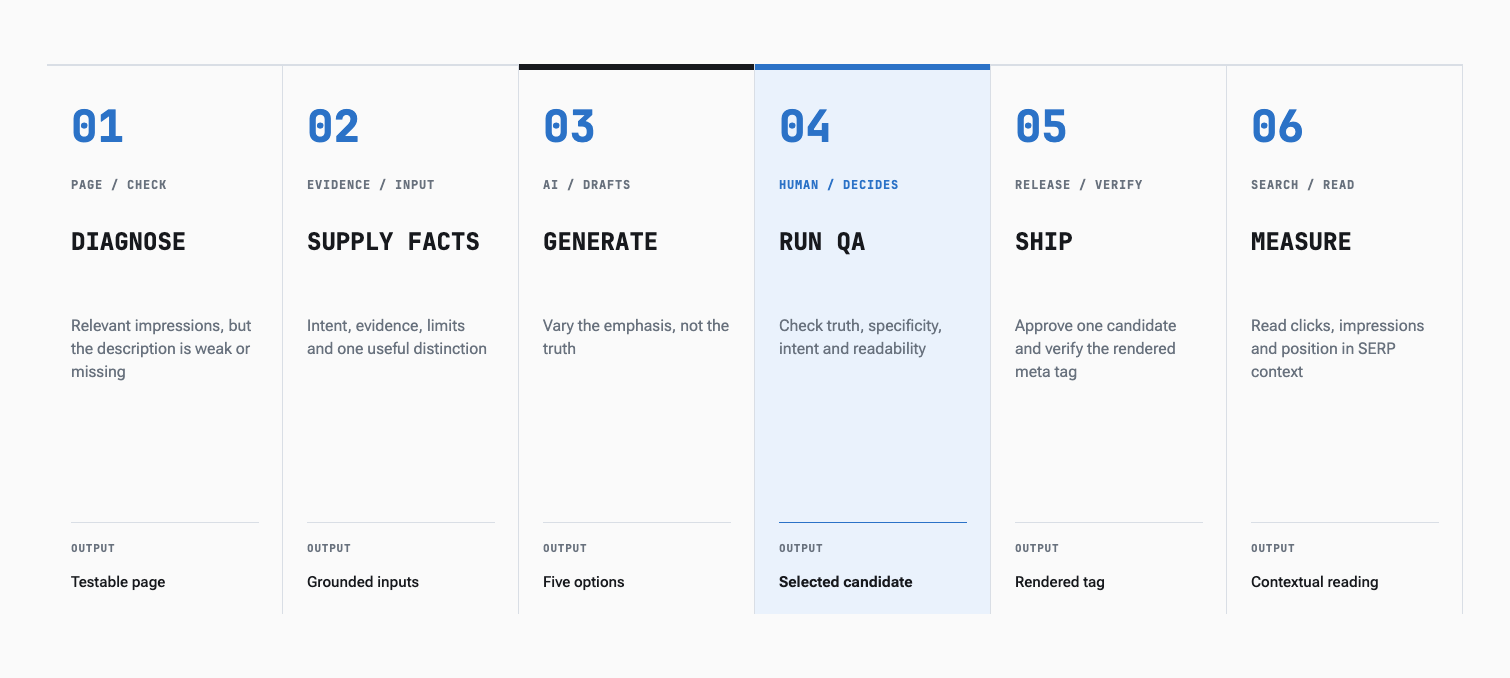
Six-step meta-description workflow: diagnose the page, supply facts, generate five options, review them, ship one candidate and measure the result in its search context. A generator is one step in the workflow. Diagnosis, evidence, human review, release and measurement still belong to you.
Give the generator facts, not a URL and a prayer
A common failure begins with a weak input packet. The model sees a keyword and fills the empty space with adjectives: seamless, powerful, effortless, revolutionary. The sentence sounds finished. The meaning never arrived.
Give a meta description generator the material a careful editor would need:
| Input | What to provide | Why it matters |
|---|---|---|
| Page job | The one decision or task the page helps with | Prevents a generic site-level pitch |
| Search intent | Relevant queries and what the searcher appears to need | Keeps the description attached to the actual visit |
| Page facts | Features, steps, limits, prices, dates, or outcomes stated on the page | Gives the candidate something specific to say |
| Audience | Who the page is for and their immediate situation | Filters out broad, context-free copy |
| Differentiator | What this page contains that similar results may not | Creates a reason to inspect this result |
| Prohibited claims | Guarantees, future features, unsupported outcomes, or missing data | Reduces and exposes fabrication risk |
| Existing metadata | Current title and description | Reveals duplication and avoids repeating the title |
Do not ask the model to infer missing product facts from the keyword. If the page does not support a claim, the description cannot borrow it from wishful thinking.
Generate options with a constrained prompt
One generated description gives you one untested framing. Ask for several candidates that emphasize different truthful reasons to click.
Write five candidate meta descriptions for one web page.

Page URL: [URL]
Page job: [the task or decision this page helps with]
Audience and situation: [who is searching and why now]
Relevant queries: [queries from Search Console]
Verified page facts: [facts stated on the page]
Distinctive value: [what this page specifically includes]
Current title: [title]
Current meta description: [description or none]
Prohibited claims: [claims the page or sources do not support]

Requirements:
- Accurately summarize this specific page.
- Match the likely intent without forcing an exact-match keyword.
- Put concrete information before adjectives.
- Do not invent features, outcomes, urgency, prices, or proof.
- Do not repeat the title in different words.
- Keep the most decision-relevant information early; do not target a fixed character count.
- Make each candidate use a different truthful emphasis.
- Return a short rationale and list the page facts used for each candidate.
- Flag missing information instead of filling it in.
The rationale is not decorative. It exposes what the model thinks the page promises. If the explanation mentions a fact you did not supply, flag it for verification or remove it before production.
A hypothetical SaaS example
Suppose you have a guide for developers who need to retry failed webhooks. The page explains exponential backoff, idempotency, retry limits, and includes a JavaScript example. Search Console shows relevant impressions for queries around retrying failed webhooks. The page does not offer an automated recovery product and does not report a success-rate benchmark.
A generic candidate might say:
> Master webhook retries with our powerful, seamless solution. Improve reliability and never lose an event again.
It is energetic and mostly unsupported. “Never lose an event” is a guarantee. “Solution” is ambiguous. The concrete material on the page has disappeared.
A more defensible candidate is:
> Learn how to retry failed webhooks with exponential backoff, idempotency, retry limits, and a practical JavaScript example.
This version is not exciting in the way a billboard is exciting. It does a better job: it identifies the task and names the evidence the reader will find.
You could test another truthful emphasis:
> Build a safer webhook retry flow: choose backoff rules, prevent duplicate processing, set retry limits, and follow a JavaScript example.
Neither candidate guarantees that Google will display it. Both give Google a useful, page-specific input and give you something concrete to evaluate.
Reject fluent nonsense before choosing a winner
Treat candidate review as a sequence of gates. A description that fails the first gate does not earn points for style.
| Gate | Pass question | Reject when |
|---|---|---|
| Truth | Can every factual phrase be verified on the page or in an approved source? | It invents a feature, result, price, date, or guarantee |
| Page specificity | Could this description belong to ten other pages? | It relies on generic benefits and brand adjectives |
| Intent | Does it help the relevant searcher predict what happens after the click? | It attracts a different audience or promises a different task |
| Useful distinction | Does it surface a real detail that helps this result compete for attention? | It merely repeats the title or target keyword |
| Reading quality | Is it clear when scanned once? | It is a keyword list, fragment pile, or stuffed sentence |
| Search-result fit | Does the important information survive likely truncation? | The essential detail or qualification sits at the end |
Notice what is missing: a sacred character count.
Google publishes no fixed length limit for a meta description; snippets are truncated as needed, usually to fit the device width. You can still use a search-result preview to catch a rambling candidate. Just treat the preview as a layout check, not as a law delivered on a stone tablet marked “160.”
Choose the shortest candidate that preserves the page's useful distinction and any necessary qualification. Shorter is not automatically better. Clearer is.
Put the description in the page you actually ship
The standard HTML output looks like this:
<meta
  name="description"
  content="Learn how to retry failed webhooks with exponential backoff, idempotency, retry limits, and a practical JavaScript example."
>
If your CMS exposes an SEO description field, store the approved candidate there rather than hard-coding it into a shared template. In Flexim's current blog_posts schema, that field is seo.metaDescription, so the description can stay attached to the content record it describes.
Then verify production, not the editor preview:
- load the canonical URL;
- inspect the rendered and confirm there is one intended description;
- check that the content matches the approved candidate;
- make sure a layout, localization layer, or deployment did not replace it;
- confirm important claims still match the visible page;
- record the release date and exact text.
For a quick browser check, run:
document.querySelector('meta[name="description"]')?.contentThis confirms what the current document exposes. It does not confirm which snippet Google will choose for every query. Different question, different evidence.
Measure CTR without inventing causality
Before release, save a small measurement note:
- URL and canonical URL;
- old and new descriptions;
- change date;
- relevant query or query group;
- baseline clicks, impressions, CTR, and average position;
- AI Overview presence, whether the page or domain is cited, and other material SERP features;
- device and country filters, if they matter to the comparison;
- other page, title, product, or site changes made in the same period.
After the page has accumulated enough impressions for a useful comparison, review a similar period in Search Console. Keep the page, query group, device, country, search type, and SERP layout as consistent as your data allows. Compare page-level data with page-level data; Search Console aggregates property and page views differently. Read clicks and impressions together. A higher CTR on a radically different query mix is not the clean victory it first appears to be. A lower CTR after an AI Overview appeared is not clean evidence against your description either.
In June 2026, Google began testing a separate Search Generative AI performance report for a subset of sites. When available, its page, country, device, date, and AI-feature impression views can help you record the visibility context. They still do not isolate the causal effect of one description edit.
Google warns that it can be difficult to attribute a Search performance change to one page edit. Competitor changes, news, seasonality, user interest, ranking movement, and other site changes can all contribute. Search Console also omits anonymized queries and truncates query data.
Your conclusion should therefore sound like this:
> CTR increased during the comparison period while average position and the main query mix remained broadly similar. The description change is a plausible contributor, not a proven cause.
Or this:
> The comparison is inconclusive because impressions were low and average position changed materially. Keep collecting evidence before attributing the result to the description.
That wording is less triumphant than “we boosted CTR by 37%.” It is also less likely to turn noise into product strategy.
The generator drafts; the page makes the promise
A useful meta description generator saves the mechanical part: producing options, varying emphasis, and checking a candidate against explicit constraints. It does not decide whether the page is worth changing, supply missing evidence, control Google's snippet, or recover clicks absorbed by an AI answer.
Pick one indexed page with relevant impressions. Export its queries and record the current SERP. Build the input packet. Generate five candidates, reject anything the page cannot prove, and ship one accurate description with a dated measurement note.
One page is enough. This is metadata, not a constitutional reform.