Topic Suggestions
Use Flexim Topic Suggestions to analyze your SaaS, discover audience needs, and prioritize SEO-ready article ideas.
Topic Suggestions turns your website into a review queue of SEO-ready article ideas. Flexim analyzes your product and audience, discovers relevant keywords, and generates topics with the search signals and decision context you need to choose what to write next.
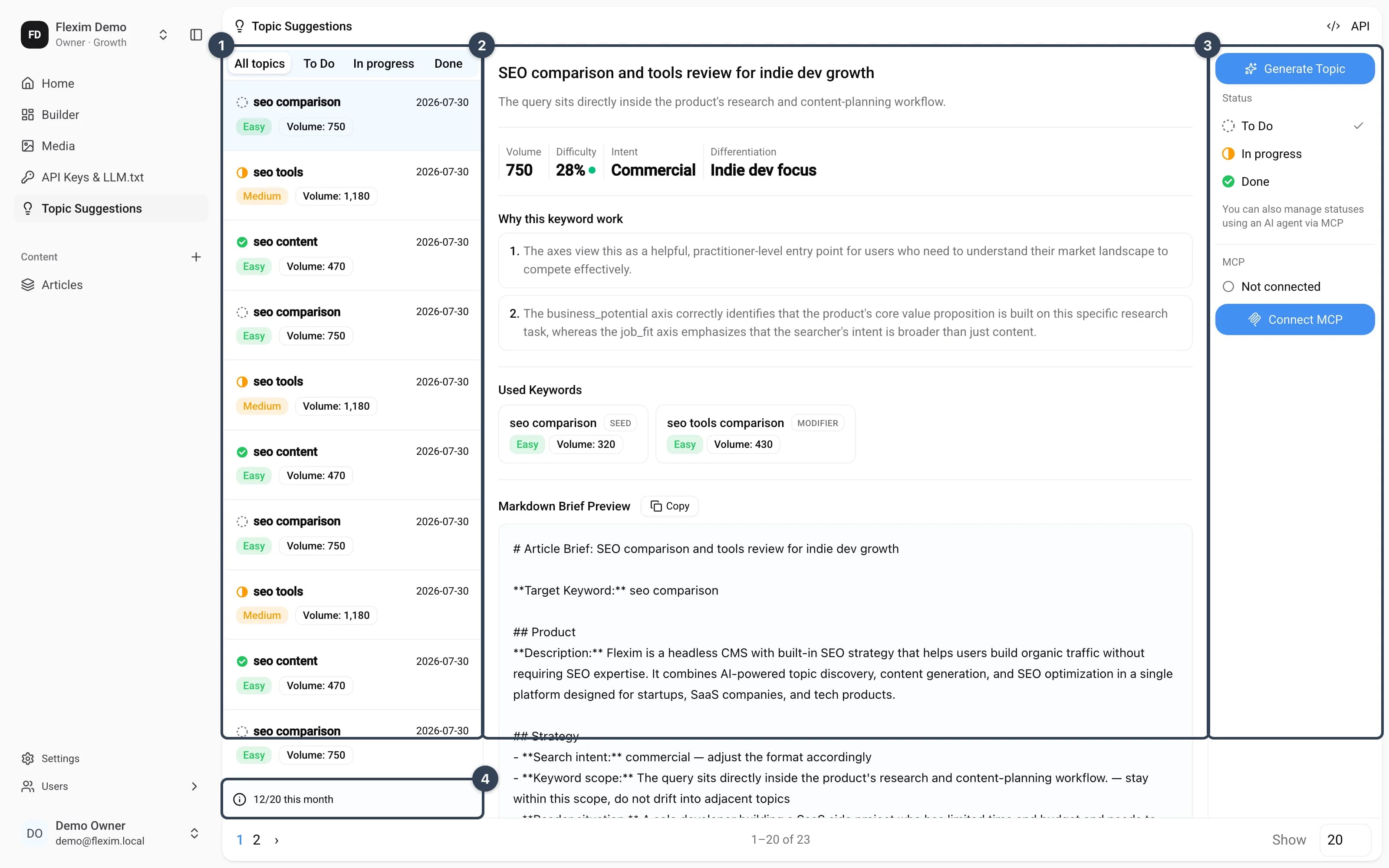
- Topic queue — filter by All topics, To Do, In progress, or Done, then select a topic to review it;
- Decision detail — inspect the topic's scope, SEO metrics, explanation, source keywords, and Markdown brief;
- Status and actions — move the topic through the workflow, open it in an AI client, or copy its Markdown or ID;
- Usage counter — see how much of the current topic allowance has been used.
How to open
Click Topic Suggestions in the left sidebar. A topic link on the Dashboard opens that topic's canonical detail page directly.
Generating topics
When you first connect a website, Flexim guides you through the research in a chat on Home:
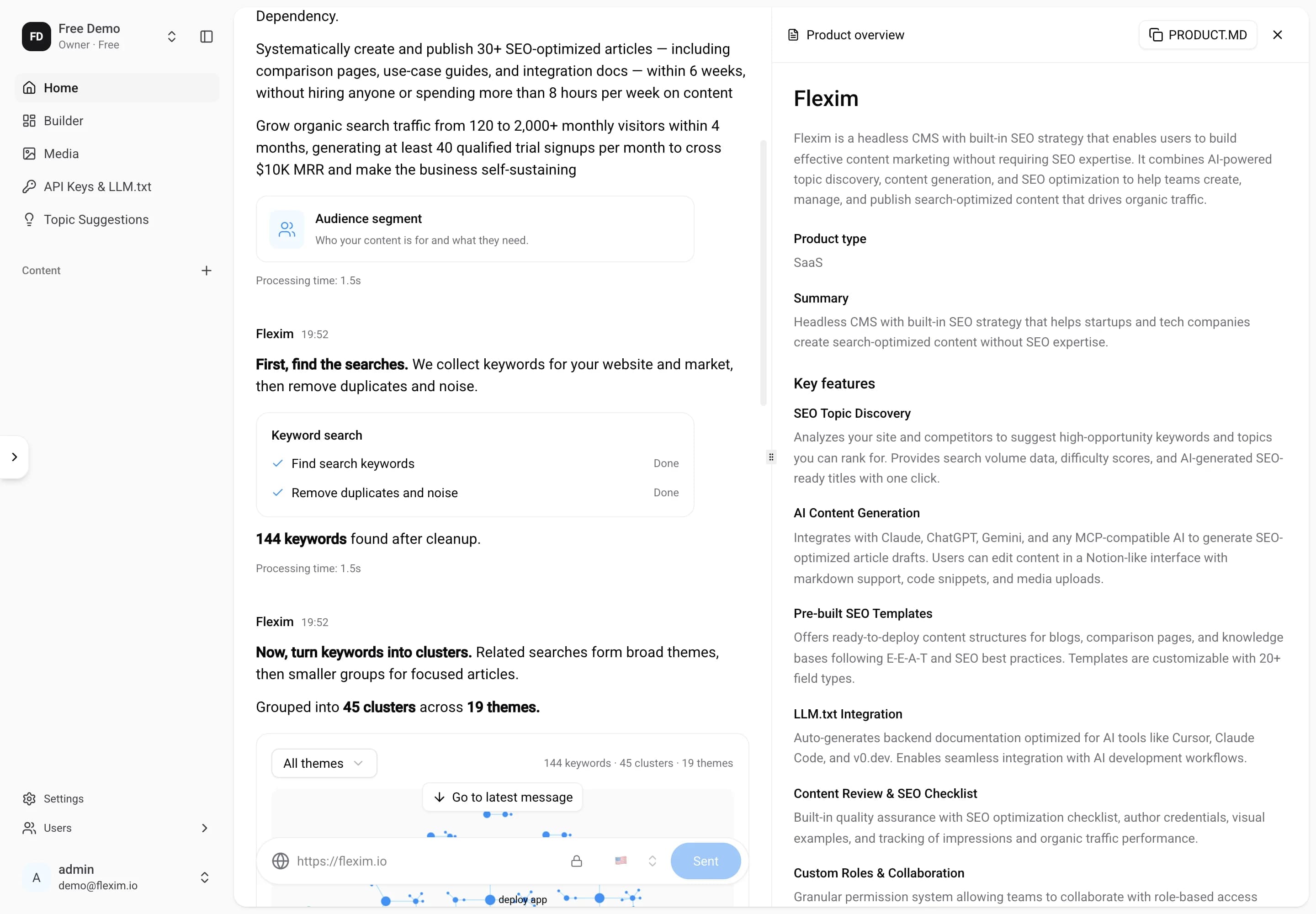
- Paste the site URL and choose the target market whose search data should be used.
- Optionally select the paperclip Attach context beside the website field to add product details, audience research, or corrections that are missing from the website. Select up to five TXT, Markdown, JSON, PDF, or DOCX files, at most 5 MB each and 10 MB in total. PDF files must contain selectable text and have at most 50 pages; the combined extracted context must fit within 100 KB. You can remove individual files or add more before starting.
- Select Connect once all files have finished uploading. Flexim uses their text together with the website to describe your product and audience segments. Connecting the site starts the topic pipeline automatically.
- Follow the chat while Flexim analyzes the product and audience, collects and cleans up keywords, groups related searches, and reviews the clusters.
- Open Product overview or Audience segment to read the saved analysis beside the conversation. Use the copy button in the artifact header to copy it as Markdown for
PRODUCT.MDorSEGMENTS.MD. - Topics appear one by one as they are saved. The Preparing your topics checkpoint shows progress and the current activity. Wait for Your first topics are ready before moving to your writing agent. The count depends on the results and your plan.
Reloading the page keeps the selected research and its saved results. Later, use Home → Open research to return to the research behind the latest completed batch, including its original website and market. You can also open saved topics from the Topic Suggestions queue.
If an attachment cannot be read, replace it or remove it before connecting. Scanned PDFs need a text version; Flexim does not run OCR. The extracted text is saved with the research and used for the product and audience analysis.
Repeated product-analysis requests are limited to 10 per hour. If you reach this limit while revising your files, keep them attached and retry in an hour.
Uploaded files appear as compact labels in the chat. Source files in Product overview also shows their format, size, and upload date. Select a filename to download the original. Saved sources remain available when you reload or reopen that research and are private to your workspace. They are not added to the public media library. Files uploaded without starting analysis expire after 24 hours; upload them again if they are no longer available. A workspace can hold up to 20 unused files. If you reach this limit, remove unused uploads or wait for them to expire. If uploads are temporarily rate limited, try again after a minute.
The product analysis identifies a primary audience and shows who each task belongs to: a customer, supplier, partner, or the product team. A role is marked unknown when there is not enough information. The audience segment builds on the primary audience. If your file describes several participants, state which audience you want to reach. The website determines the analysis language; attaching a document in another language does not select a different language.
If research is interrupted
- Stop research pauses after the current step; results already saved remain available.
- Resume research continues a stopped or failed run when the server can resume it.
- Try again retries a failed read or configuration request. Reconnecting or reloading the page also refreshes the saved state.
- Start new research is available after a completed run with no topics, or when the next research stage could not start. It starts a new run only when you select it.
Some older runs do not contain every saved analysis. Their missing artifacts are shown as unavailable; this does not mean a new analysis has been run.
Writing with your AI agent
After the saved topics are ready, the chat offers Codex, Claude Code, and Another agent tabs.
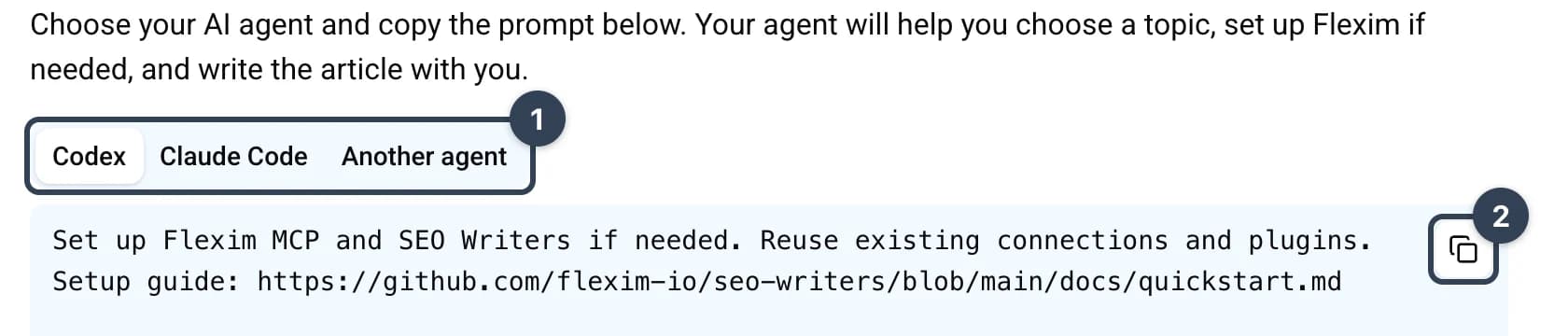
- Choose your agent in the tabs.
- Select Copy writing prompt and paste it into the agent. It helps connect Flexim MCP and install SEO Writers if needed, reusing existing connections and plugins.
- The agent finds your generated topics through MCP, compares them, and asks which one you want to write. It waits for your choice.
- After you choose, the agent loads that topic's full Article Brief and continues in SEO Writers.
The copied prompt does not contain the product analysis or a fixed list of topic IDs. The agent reads the current topics and the selected brief from the connected workspace.
If your workspace role does not allow MCP, open a topic and copy its Markdown brief. A workspace owner can enable MCP access for the connected workflow.
After the article is ready
A topic is an idea and writing brief; it is not an article or a saved CMS entry. After you approve the finished article, SEO Writers helps you choose where to keep it:
- Use your own CMS: take the article Markdown and metadata into your publishing system.
- Use Flexim: the agent can set up the missing blog structure through MCP and, with your permission, save a private draft. It reads the saved entry back and gives you its direct Flexim link.
Marking a topic Done records that the writing is finished. It does not prove that a draft was saved or that anything was published. Connecting your website to the Flexim API is a separate later step; see API documentation.
Further batches
Once you have topics, no further action is needed — the next batch arrives automatically with every billing cycle (see Automatic monthly topics below).
Reviewing a topic
Each item in the queue is one article idea:
- Status icon — the current To Do, In progress, or Done state;
- Keyword — the seed keyword behind the topic;
- Difficulty — Easy for KD below 30, Medium for KD 30–59, and Hard for KD 60 or higher;
- Volume — the topic's estimated monthly search demand;
- Created — when the topic was generated.
Click a topic to open its detail page. On desktop, the queue stays beside the detail; on smaller screens, the topic opens as its own page.
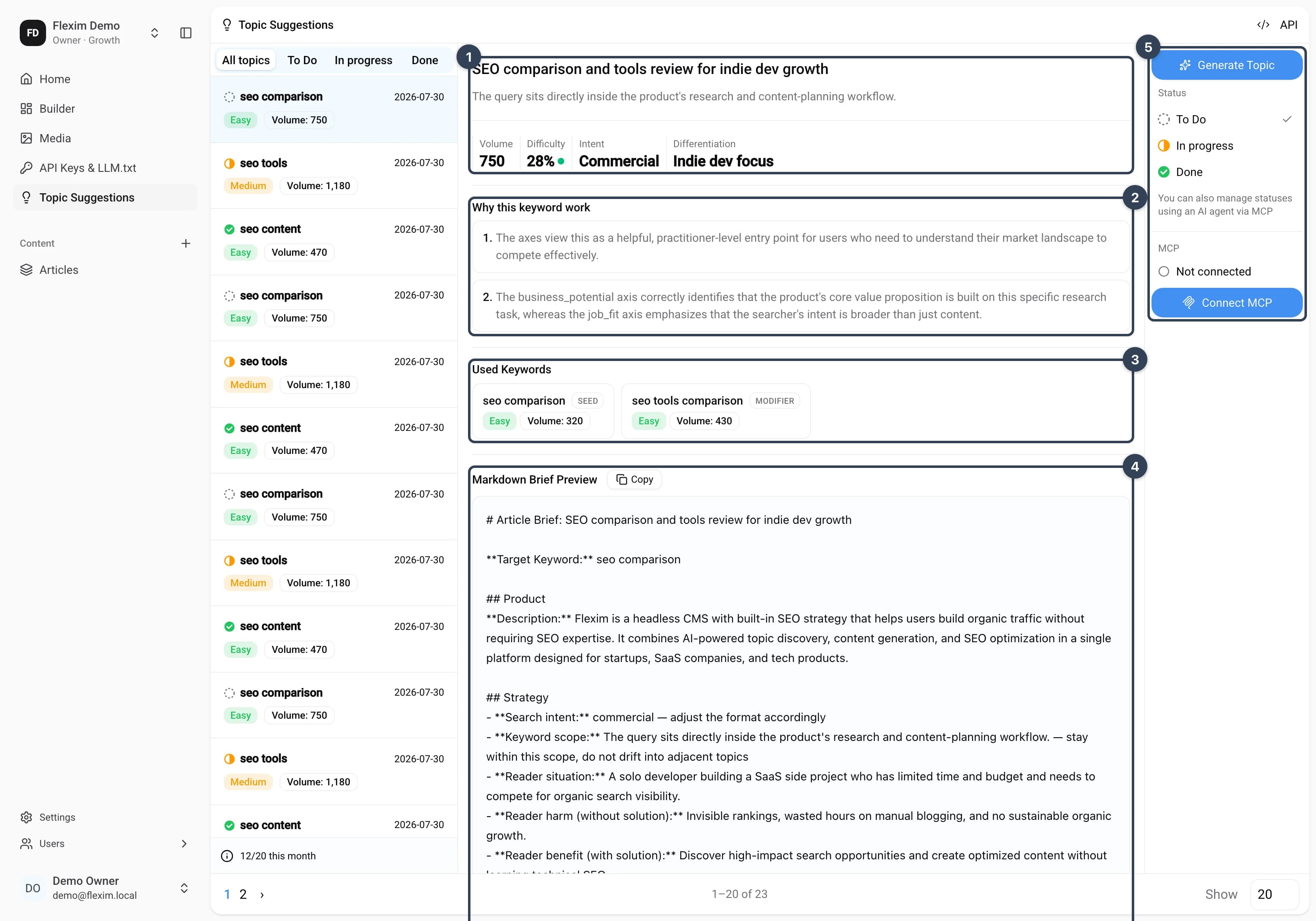
- Scope and metrics — the seed keyword scope, volume, numeric KD, search intent, and differentiation angle;
- Why this keyword work — two or three evidence blocks explaining why the opportunity fits the searcher and the product. Older topics may show Explanation unavailable if they predate this snapshot;
- Used Keywords — the seed and selected modifiers, each labeled with its role, difficulty, and individual volume;
- Markdown Brief Preview — the complete Article Brief, enriched with product, audience, strategy, and writing instructions;
- Status and actions — update the topic status, open the brief in an AI client, or copy the Markdown or topic ID.
The Generate Topic menu contains four topic-scoped actions:
- Open in ChatGPT;
- Open in Claude;
- Copy Markdown;
- Copy ID.
When MCP is connected, Open in ChatGPT and Open in Claude pass the topic ID and ask the client to load the brief with the Flexim MCP tool. If MCP is not connected, the same actions use the public prompt handoff instead. Copy Markdown always copies the current Article Brief, while Copy ID is useful when you want to name the topic explicitly in any connected MCP client.
MCP connection
The right column shows the workspace-level MCP state. Select Connect MCP when no client is connected, or Manage MCP to review existing connections in Settings → MCP. Loading or unavailable connection checks never display a false connected state.
See MCP for client setup, permissions, and connection management.
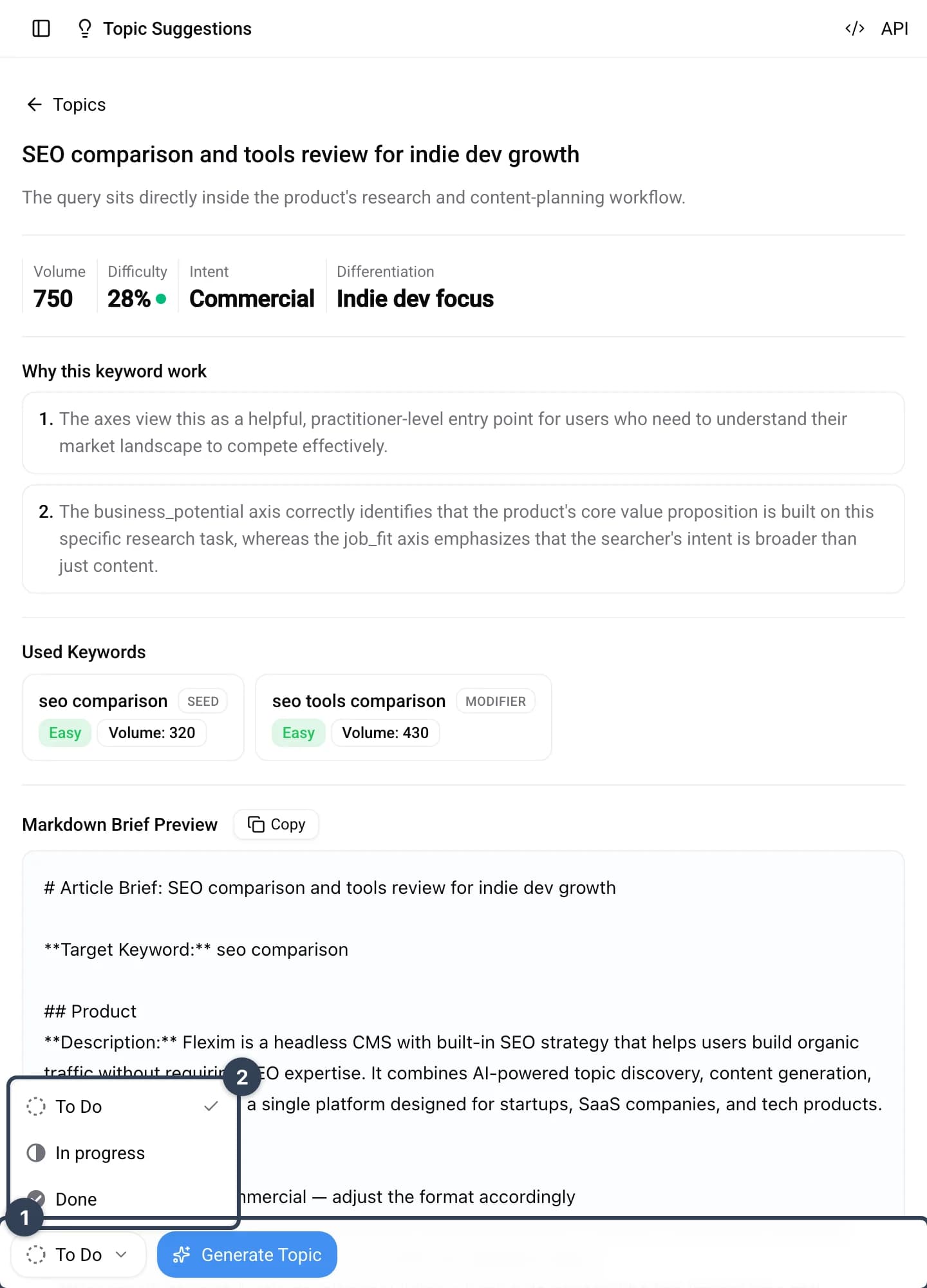
Topic statuses
Topics move through three statuses, and the tabs above the queue filter by them:
- To Do — fresh ideas you haven't started yet;
- In progress — topics you've taken into work;
- Done — the article is written; saving and publishing it are separate actions.
Use the status controls in the right column on desktop or the status menu in the sticky action bar on smaller screens. An MCP client with permission can update the same status for you.
Generation limits
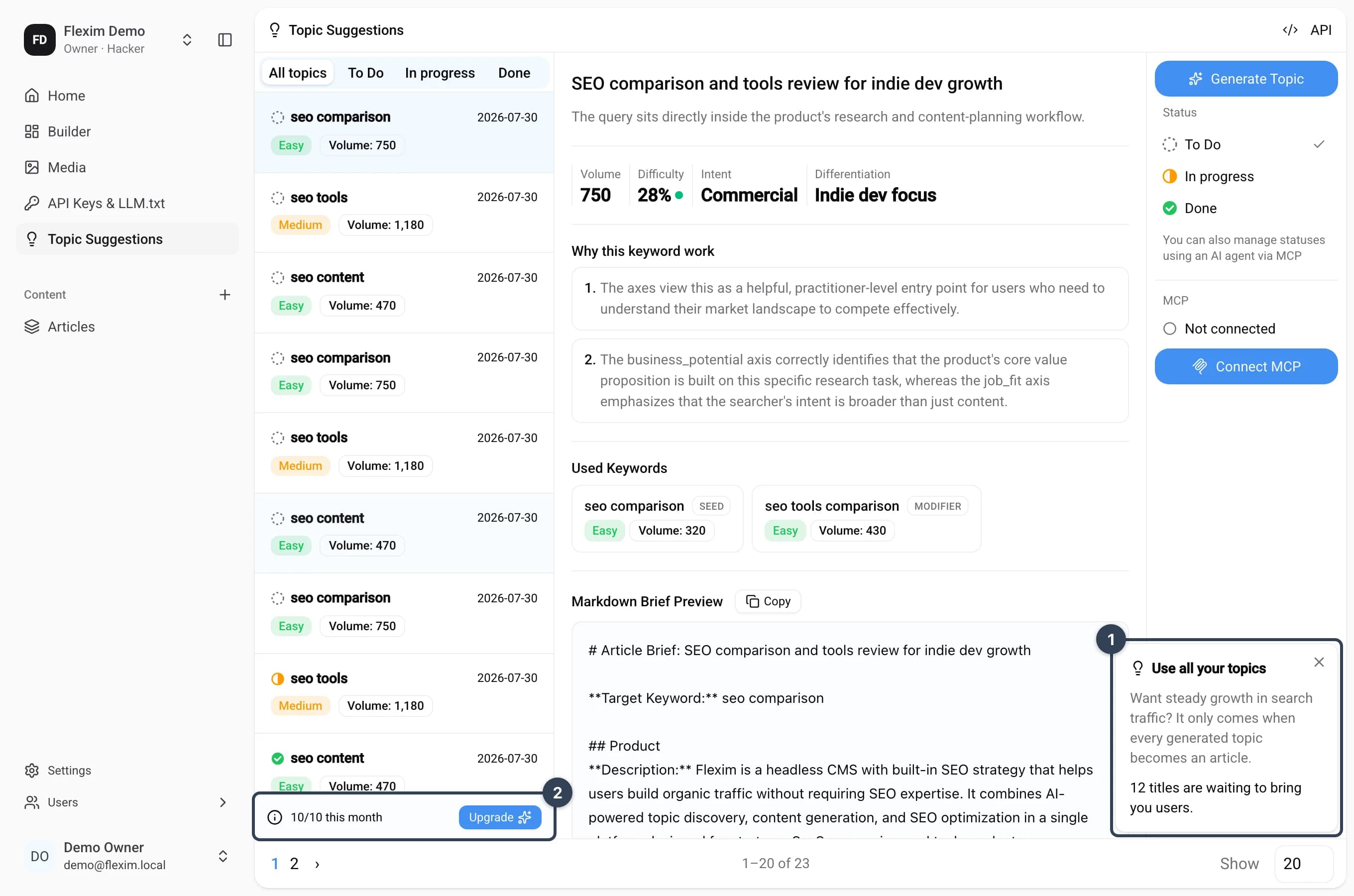
The counter below the topic queue shows how much of your allowance is used — for example, 6/20 this month on a monthly plan or 0/3 trial on the Free plan:
| Plan | Title generations |
|---|---|
| Free | 3 titles total (trial, never resets) |
| Hacker | 10 per month |
| Growth | 20 per month |
Monthly quotas reset at the start of your billing cycle. When the limit is reached, generation pauses until the next cycle or an upgrade.
Use all your topics
If less than half of the topics generated this cycle have been taken into work, a reminder card appears in the bottom-right corner of the page — steady search-traffic growth only comes when every generated topic becomes an article. Dismissing the card hides it until the next billing cycle.
Automatic monthly topics
On paid plans Flexim keeps your Topic Suggestions topped up automatically. Every billing cycle the system checks how many topics your plan includes, how many have already been generated this cycle, and fills the difference — no manual runs needed. When the batch for the cycle is complete, you receive a "topics are ready" email.
A few things to know:
- The initial website analysis is the only manual step — after it, top-ups are fully automatic and always respect the same cycle allowance, so nothing overlaps or double-generates.
- If your site has no keyword strategy yet, Flexim first runs the initial keyword discovery for you — provided the product and audience analysis has been completed during onboarding.
- If something blocks the batch (for example, there is not enough context to discover keywords), the cycle stays visibly incomplete with a clear status and resumes automatically once the missing piece is in place — Flexim never quietly delivers less than your plan includes.
- Upgrading your plan mid-cycle starts a fresh cycle with the full new allowance right away; downgrading takes effect from the next cycle, so the current one is never reduced.
Automatic keyword replenishment
Sometimes the keyword pool runs out before the cycle allowance is reached — for example, when your niche is narrow or most keywords have already been turned into articles. In that case Flexim does not silently stop short. It automatically expands the pool:
- takes the keywords behind your already successful topics as starting points;
- discovers closely related search queries from search data providers;
- filters and clusters them with the same quality checks as your original keyword strategy;
- continues generating topics until the cycle allowance is reached.
A few guarantees along the way:
- Only fresh keywords are added — anything already in your pool, already used by a topic, or previously filtered out by the quality checks is skipped automatically, so you never pay twice for the same candidate.
- Rejecting a topic simply returns its keyword to the pool for future use; rejection never triggers an automatic replacement.
- If no suitable related keywords can be found, generation pauses with a clear status instead of finishing below the allowance, and resumes when new keywords become available.
API access
Your topics are also available programmatically — click the API button in the page header to see the endpoint and try it with your API key. A connected MCP client can list topics, load a selected Article Brief by topic ID, and update its status.